 Skip to content
Conversion Mapping
- Home
- Zaris Features
- Conversion Mapping
Carry every field forward — from Lead to Deal to Project.
The Conversion Mapping module in Zaris CRM allows administrators to define how data transfers between key CRM modules during record conversion. It ensures smooth continuity of information, eliminating manual data re-entry and maintaining accuracy across related records.
From sales pipeline to project execution
Field-level continuity
Pair every Lead field with its destination in Contacts, Organizations and Deals. Standard and custom attributes are honored on every conversion.
Custom fields supported
Map text to text, currency to currency, picklist to picklist. Compatibility is enforced so admins ship reliable conversions without test cycles.
Sales to delivery handoff
When an Opportunity closes, the right fields flow into Projects so the delivery team starts the next phase with full sales context already in place.
Lead Conversion Data Mapping
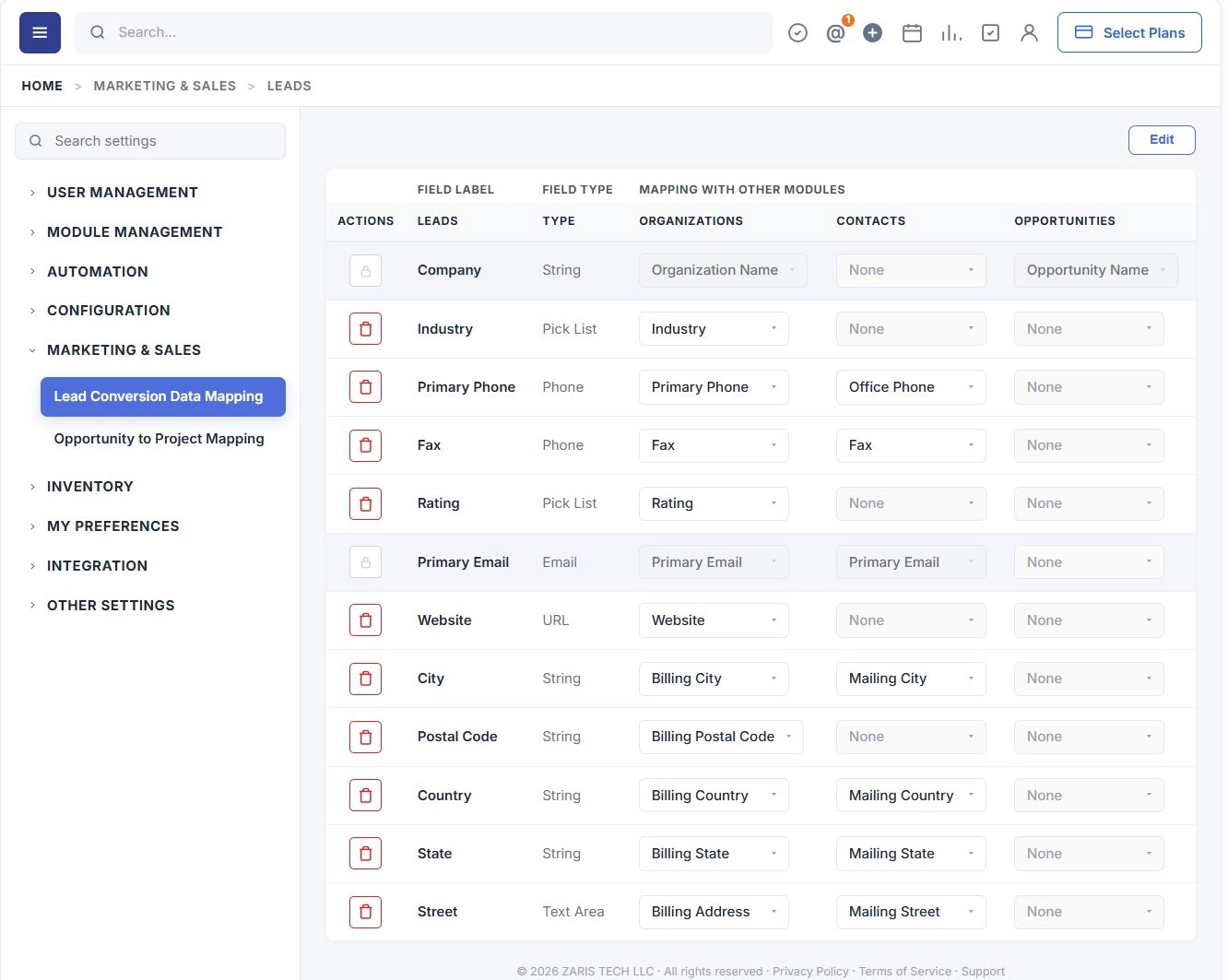
Define how a Lead’s information travels into Contact, Organization and Deal records the moment a sales rep clicks Convert. Mapping happens once at the administrator level and applies to every conversion across the workspace.
Configuration steps
- Open Settings → Marketing & Sales and select Lead Conversion Data Mapping.
- For each Lead field, choose the matching field inside the Contacts, Organizations and Opportunities columns.
- Match data types deliberately — text to text, phone to phone, picklist to picklist. Zaris flags mismatches before save.
- Leave a column on None when a field doesn't apply to that module. The conversion will simply skip it.
- Click Save. New mappings apply to every conversion immediately, no deployment step required.
Opportunity to Project Mapping
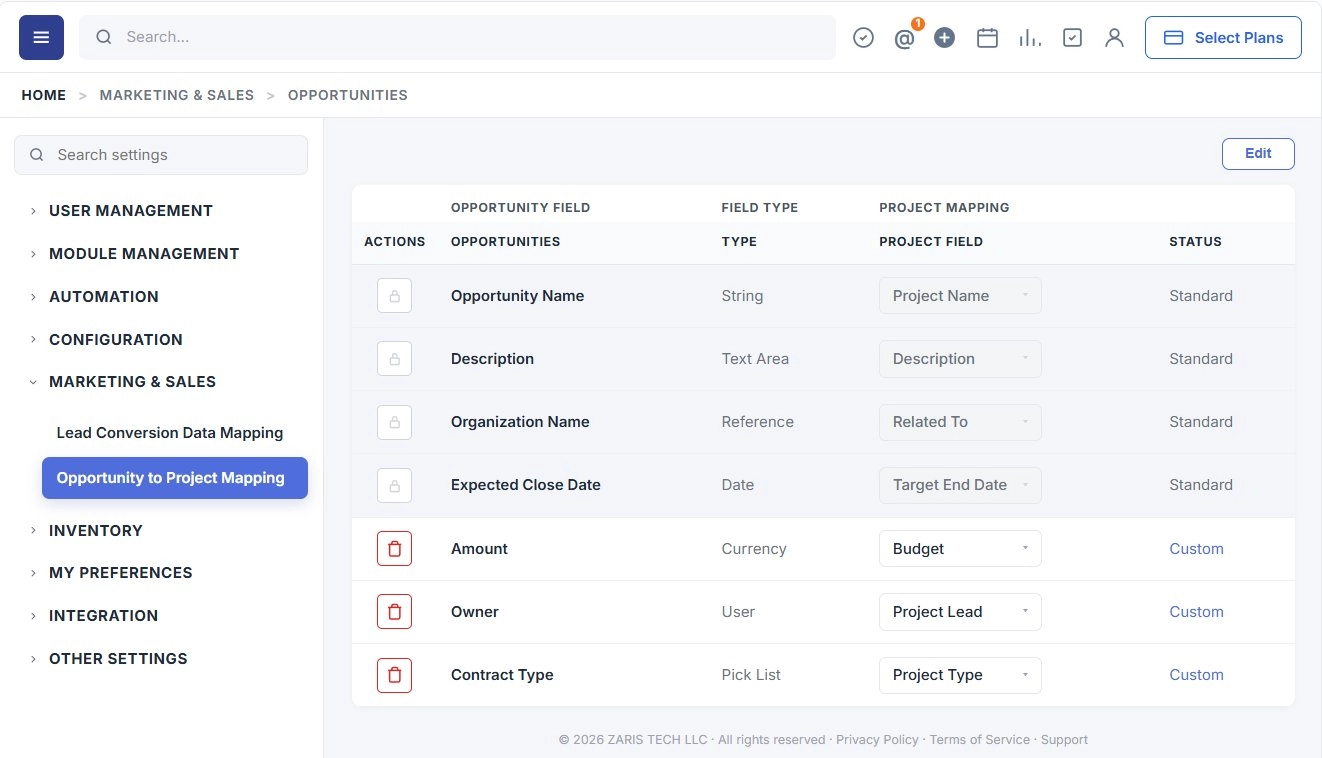
When a Deal closes and a Project record is created, Zaris CRM automatically carries forward the fields that operations and delivery teams need. Standard fields are mapped out of the box; you can extend the mapping for any custom field defined in the Opportunity module.
Standard Fields:
Zaris CRM automatically maps several key fields to maintain consistency between Opportunities and Projects:
| Opportunity Field | Project Field |
|---|---|
| Opportunity Name | Project Name |
| Description | Description |
| Organization Name | Related To |
| Expected Close Date | Target End Date |
These predefined mappings cannot be changed but ensure that essential business data carries forward.
Custom field configuration
To extend the mapping with custom Opportunity fields:
- Open Settings → Marketing & Sales → Opportunity to Project Mapping.
- Select a custom field from the Opportunity column.
- Pick the matching custom field in the Project column. Field types must be compatible (text → text, currency → currency, date → date).
- Save. The mapping is applied to every future Opportunity-to-Project handoff.
Custom Field Configuration
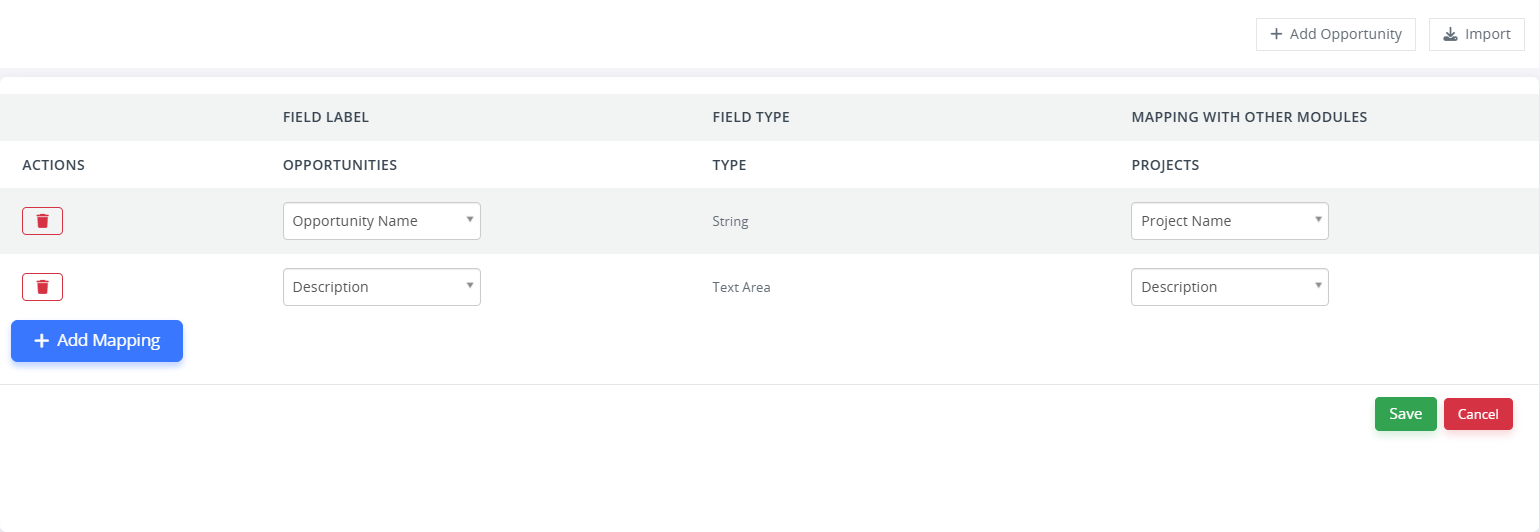
Administrators can extend this mapping to include custom fields created in the Opportunity module:
- Navigate to Settings → Marketing & Sales
Select the Opportunity to Project Mapping.
From the available field list, choose your custom field in the Opportunity module.
Map it to an appropriate custom field in the Project module.
Ensure compatible field types (e.g., text → text, currency → currency).
Click Save to apply your configuration.
Conversion mapping benefits
A single configuration pays off in cleaner data, faster handoffs and an audit trail that connects every Lead to the Project that fulfilled it.
Ensures Data Continuity
Information captured in marketing carries into sales and into delivery without losing fidelity. Each record can be traced back to the original Lead.
Eliminates Manual Re-entry
Reps don’t retype phones, addresses or qualification notes. Mapped fields land where they belong the moment the conversion happens.
Supports Custom Fields
Industry-specific attributes vertical codes, account tiers, contract types flow into the right home in Contact, Organization, Deal or Project records.
Improves Workflow Efficiency
Operations and delivery teams open Projects already populated with everything Sales had agreed to. Less status meetings, fewer dropped commitments.
