 Skip to content
Mentions
- Home
- Zaris Features
- Mentions
Stay Notified, Stay Connected
The Mentions module allows users to tag teammates in comments using “@username,” ensuring the right people get notified instantly. This feature strengthens team collaboration by keeping discussions linked to CRM records.
How Mentions Work
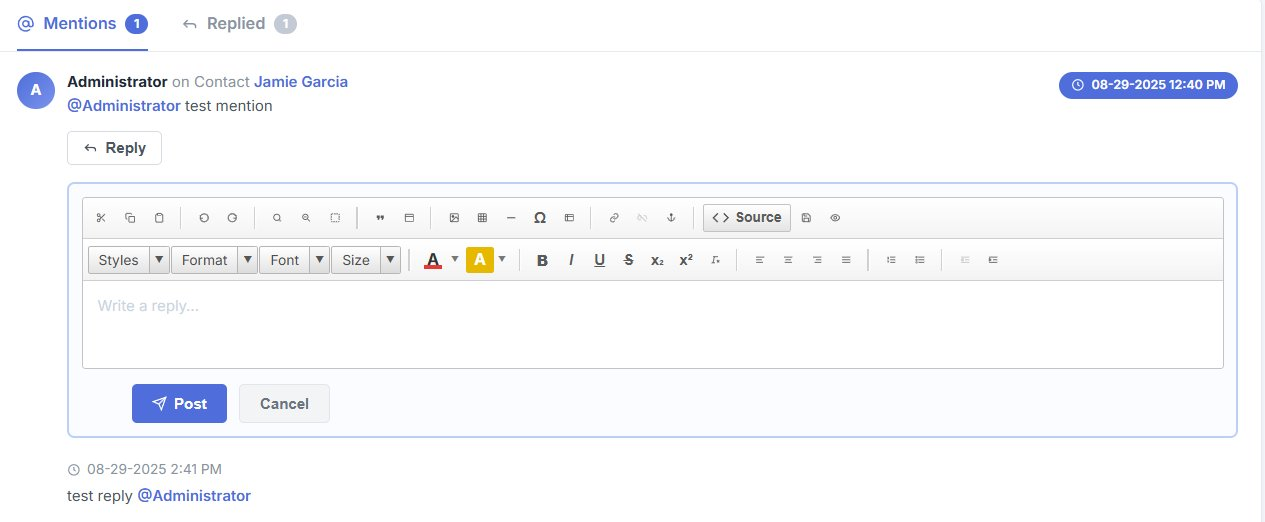
All tags appear under the Mentions icon located in the top navigation bar. Along with a count, it highlights all comments where you are tagged. From here, you can:
Jump directly to the comment.
Open the parent record linked to it.
Reply instantly without leaving the screen.
Conversations in One Place
The Mentions popup provides a compact sidebar view where you can see all tagged discussions, reply quickly, or catch up on missed updates all without breaking your workflow.
Team Collaboration Made Easy
Mentions ensure that no detail is lost. Whether clarifying sales data, approving a task, or flagging an issue, team members stay informed and connected.
Use Cases:
Sales teams collaborating on leads.
Support teams resolving tickets together.
Project managers coordinating tasks.
Collaborate Smarter with Real-Time Mentions
Keep everyone aligned with notifications and context that travel with the record.
Never Miss an Update
Notifications keep you aware of every tag or comment that needs your input.
Faster Collaboration
Reply instantly from the popup without navigating through records.
Context-Rich Communication
Every mention is tied to the relevant CRM record, ensuring clarity and transparency.
