Keyboard Shortcut
- Home
- Zaris Features
- Keyboard Shortcut
Work Smarter with CRM Keyboard Shortcuts
The Keyboard Shortcut Module helps users perform common CRM actions faster using simple key combinations. Instead of navigating menus and clicking multiple times, users can jump to the right screen or trigger important actions instantly. CRM administrators can create, customize, and manage shortcuts from CRM Settings for a smoother, more productive experience.
Create Custom Shortcuts
Define shortcuts for frequently used modules or actions, such as opening Leads, creating a Contact, or starting a new Task.

Enable / Disable Shortcuts
Users can activate shortcuts when needed or disable them if they prefer standard navigation.

Centralized Management
All shortcut settings are managed in one place under CRM Settings, making it easy for administrators to standardize across teams.

Flexibility
Assign different key combinations to different modules, ensuring quick navigation tailored to business needs.
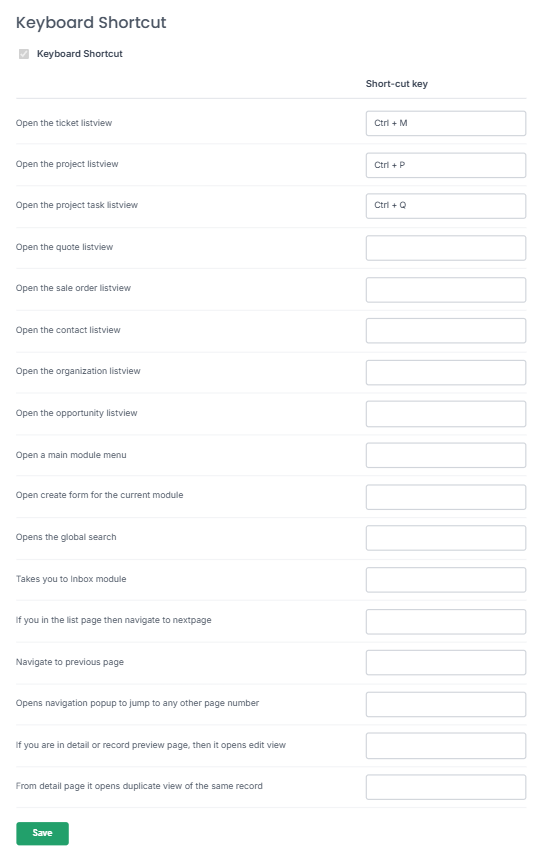
Keyboard Shortcut Settings
Manage every shortcut from CRM Settings enable the module, map functions to key combinations, and save. Administrators can standardize shortcuts across the entire organization.
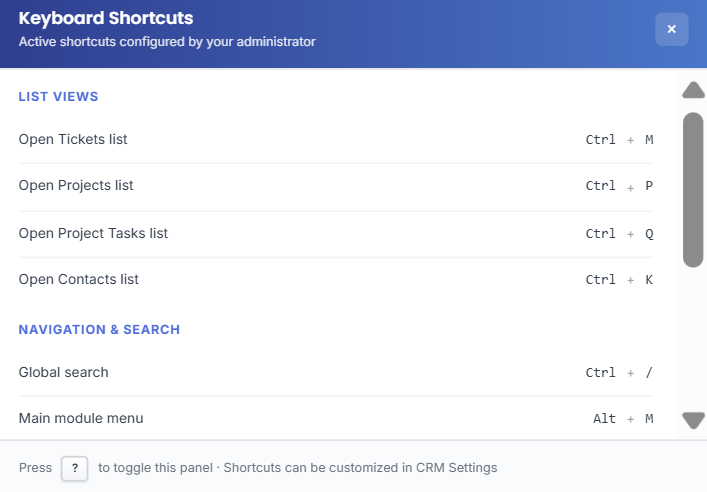
Shortcut Help Overlay
In a busy CRM environment, seconds add up to hours. Users can open the built-in shortcut reference at any time — a quick cheatsheet grouped by category so your team always knows which keys to press without leaving the screen.
- Grouped by List Views, Navigation, Search and Record Actions.
- Visual key badges for every active shortcut.
- Press ? anytime to open or close the help overlay.
Benefits of Sales Orders Module
Boost Productivity
Save time by accessing modules or performing actions instantly.
Simplify Navigation
No need to click through menus for common tasks.
Reduce Errors
Perform actions quickly and accurately with predefined keys.