...

The Ultimate Zaris CRM Mobile App for Your Sales Team

Empower your team with the Zaris CRM Mobile App. Fully integrated with your Zaris servers, it delivers complete, real-time visibility into leads, opportunities, billing, and projects directly from your phone.

Zaris CRM Mobile App dashboard showing real-time KPIs

Everything You Need to Close Deals, On the Go.

Seamlessly connected to your Zaris CRM server. No data sync delays, no missing follow-ups.

0
CRM Modules
Leads, Deals, Invoices, Projects, AI & more in one app.
0
Real-Time Sync
Direct, live connection to your company's CRM server.
0
AI Assistant
Summarize deals & draft follow-ups instantly from your phone.
0
Dedicated Support
Expert help available anytime at [email protected].
Enterprise-Grade Security
Lightning Fast Performance
Zaris Compatible
Secure Data Encryption

Powerful CRM Modules, Built for Mobile

Every module from your desktop CRM, optimized for your phone.

Lead Management

Capture prospects, track status & source, follow up, and convert to Contacts, Organizations & Opportunities

Opportunity Tracking

Track deals with amount, sales stage, probability. Move through pipeline from Qualification to Closed Won

Contacts & Organizations

Manage people and companies. Link contacts to orgs so quotes, tickets & invoices stay connected

Quotes & Invoices

Create commercial offers with products, quantities, prices, discounts & tax. Generate invoices and track payments

Sales Orders & Products

Manage product catalog, price books, and confirm accepted offers with sales orders

Tickets & Support

Create support cases with priority & severity. Link to customers and track until resolution

Mobile-First Interface

Everything You Need, Organized in 5 Tabs

After login, access your entire CRM from five intuitive tabs at the bottom of your screen.

Home Dashboard
Home Dashboard

Dashboard & Quick Actions

Your personalized greeting, KPI cards (Total Leads, Pipeline, Won Deals), and one-tap shortcuts to create Leads, Opportunities, Tasks, and Quotes instantly.

Leads Management
Leads List

Prospect Management

View All Leads, My Leads, or Follow-ups. Use filters for status and source, search by name, and convert qualified prospects into deals.

Sales Deals Tracker
Opportunities

Sales Deals Tracker

Track deals with amount, sales stage, and probability. Move through the pipeline from Qualification to Closed Won with built-in AI assistance.

People Directory
Contacts

People Directory

Search by name or organization. View full contact profiles, linked opportunities, and activity history to maintain strong relationships.

All Modules
More Menu

All Other Modules

Access Organizations, Products, Quotes, Orders, Invoices, Projects, Documents, Tickets, Calendar, Reports, AI, and Settings from one central hub.
Explore Every Module in Detail

A complete ecosystem of modules designed to manage your entire sales pipeline, from the first lead to the final invoice.

Leads Management

Capture prospects, track their status, and convert qualified interest into active deals. 
  • Record full details: Name, Company, Designation, Status, and Source
  • Track contact info: Mobile, Email, Website, and Full Address
  • Log company size signals: Employees count and Annual Revenue
  • Quick Actions: Call, Email, Add Note, or Convert to Contact/Org/Opportunity
  • Filter by tabs: All Leads, My Leads, or Follow-ups

Opportunities & Deals

Track revenue-generating deals through every stage of your sales pipeline.
  • Monitor deal value: Amount, Currency, Sales Stage, and Probability (%)
  • Link related records: Organization, Contact Person, and Product Lines
  • AI Assistant: Get smart summaries and next-step suggestions directly on the deal
  • Create Projects instantly when a deal is marked “Closed Won”
  • Track history: View related quotes, activities, and documents in one place

Contacts Directory

Manage people and link them to organizations to keep relationships organized.
  • Store complete profiles: Name, Title, Department, and Contact Type
  • Multiple channels: Mobile, Phone, Home/Other, Email, and Fax
  • Detailed addresses: Mailing and Other address with City, State, ZIP
  • Relationship tracking: View linked Opportunities, Quotes, Orders, and Activities
  • Search easily: Find contacts by name or organization instantly

Organizations (Accounts)

The central hub for all company-level data, deals, and billing information. 
  • Company identity: Legal Name, Type, Industry, and Website
  • Business metrics: Employee count and Annual Revenue
  • Communication: Primary Phone, Email, Fax, and Billing/Shipping Addresses
  • One-click creation: Add related Contacts, Activities, and Notes without leaving the page
  • Centralized view: See all deals, quotes, and invoices tied to this account

Quotes & Proposals

Create professional commercial offers with detailed line items and pricing.
  • Line Item Management: Product, Quantity, Unit Price, Discount, and Tax
  • Track lifecycle: Created → Delivered → Accepted stages
  • Essential details: Valid Until date, Terms & Conditions, and Description
  • Linked records: Automatically attach to Organization and Contact
  • Seamless flow: Convert accepted quotes directly into Sales Orders

Invoices & Billing

Request payments and track outstanding amounts with precision.
  • Payment tracking: Status updates (AutoCreated, Sent, Paid)
  • Financial details: Payment Method, Terms, and Billing/Shipping Address
  • Source linking: Connect to Sales Orders or Quotes for audit trails
  • Dashboard visibility: “Outstanding” KPI card reflects unpaid invoices instantly
  • Complete records: Includes product lines, discounts, and tax calculations

Projects

Manage post-sale delivery, timelines, and team tasks effectively.
  • Project setup: Name, Status, Type, and Target End Date
  • Customer linkage: Related Account and Contact prefilled from Opportunity
  • Task management: Add Tasks and Milestones to track progress
  • Documentation: Attach notes and files relevant to the delivery
  • Workflow integration: Create directly from a “Closed Won” opportunity

Tickets

Handle customer support cases with priority-based triage and tracking.
  • Triage fields: Priority, Severity, Category, and Status
  • Issue tracking: Detailed description and title for clear context
  • Customer linkage: Link ticket to specific Organization or Contact
  • Activity log: Add callbacks and updates until resolution
  • Lifecycle management: Track from “Open” to “Closed” seamlessly
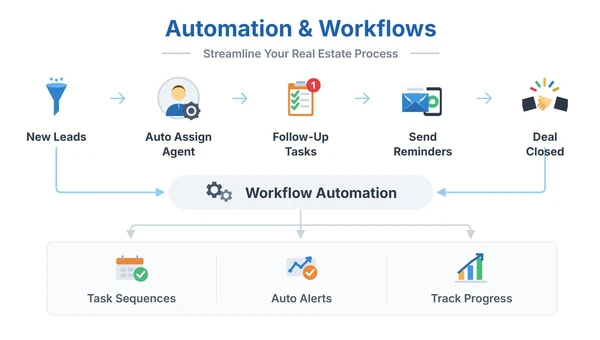
Automation & Workflows

Your Day at a Glance

The Home dashboard summarizes your day with personalized greetings, real-time KPI cards, and one-tap shortcuts into every module.

Time-based greeting with your name

Total Leads, Opportunities, Pipeline Value, Won Deals

Revenue & Outstanding amounts by role

Quick Actions: Lead, Opportunity, Task, Quote, Org, Contact, Invoice, Event

Pull-to-refresh for real-time numbers

Notification bell with unread badge

Built-In Workflows That Match How You Sell

Four end-to-end sales processes, ready inside your Zaris CRM app from first contact to closed deal to customer support.

New Enquiry → Qualified Deal
1
Add Lead
Capture prospect details
2
Log Call / Task
Record follow-up activity
3
Convert Lead
Turn into opportunity
4
Move Opp Stages
Qualify → Close Won
Outcome: Prospect becomes a qualified, tracked sales deal
Quote → Cash
1
Create Quote
Build pricing proposal
2
Send / Deliver
Share with customer
3
Sales Order
Confirm the deal
4
Invoice → Paid
Collect payment
5
Attach PDFs
Store all documents
Outcome: Full quote-to-payment cycle tracked in one place
Delivery After Closed Won
1
Create Project
Link to closed deal
2
Add Tasks / Milestones
Plan delivery steps
3
Track on Dashboard
Monitor progress live
Outcome: Every won deal moves smoothly into managed delivery
Customer Support
1
Create Ticket
Log support request
2
Link Customer
Connect to contact/org
3
Add Activities
Log calls & updates
4
Close Ticket
Mark issue resolved
Outcome: Every customer issue tracked, linked and resolved on time

15+ Modules. One App.

Every module from your desktop CRM, optimized for your phone.
Leads
Opportunities
Contacts
Organizations
Activities
Calendar
Tasks
Tickets
Quotes
Sales Orders
Documents
Projects
Products
Reports
Leads
Opportunities
Contacts
Organizations
Activities
Calendar
Tasks
Tickets
Quotes
Sales Orders
Documents
Projects
Products
Reports

We've Got Your Back (SUPPORT & HELP)

FAQs & Help Center

Built-in FAQs and Help Center accessible from the app's More → Help & Support menu

Email Support

Reach our team at [email protected] for account, sync, or technical issues

Report a Problem

Use the in-app "Report a Problem" or "Contact Support" options for quick issue resolution

Meet ZARIS AI — Your Intelligent Sales Assistant

Ask the AI assistant for CRM help anytime. Summarize a deal, get suggested next steps, or draft follow-up ideas right from your phone.

🧠 Summarize any deal or opportunity
💡 Get smart next-step suggestions
✍️ Draft follow-up emails & messages
🔗 Access AI from any Opportunity record
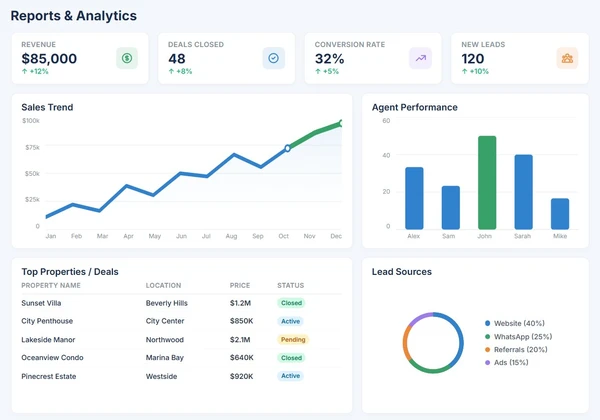
Reports & Analytics
ZARIS Management Dashboard
Real-time Data
Live Pipeline View

Management Dashboards & Detailed Reports

Get executive-level visibility into your pipeline, sales performance, outstanding invoices, and team productivity.

Sales Leads Customers Contacts Quotes Sales Orders Invoices Projects Tasks Activities Products Price Books User Performance
  • Management Dashboard with KPIs & trends
  • Top salesperson tracking
  • Outstanding amount monitoring
  • Table & Chart view toggle
  • Search & filter within reports

Management Dashboards & Detailed Reports

Give every stakeholder secure access and the visibility they need to stay connected.

Agents

Manage assigned properties, handle leads, and track deal progress all from their personalized dashboard with limited data access for privacy and accuracy.

Admins

Enjoy full control over CRM data, configurations, and user roles. Admins can monitor system activity, generate reports, and oversee performance across all modules.

Owners

Access the dedicated customer portal to upload property documents, review verification status, and stay informed about ongoing sales or rental progress.

Buyers

Log in to view recommended listings, check visit schedules, and monitor purchase or rental progress directly from their personalized buyer portal.

Frequently Asked Questions (FAQs)

Here are answers to the most common questions about starting with ZARIS Mobile App, migrating your data, and understanding our core functionalities. Click on a question to see the answer.

Connecting the Zaris CRM Mobile App requires two credentials from your CRM administrator: a Username and an Access Key.
 
  1. Get Your Access Key: Log in to your web CRM, go to My Preferences → Access Key, and copy your unique key.
  2. Open the App: Launch the Zaris CRM Mobile App and enter your Username (format: companyname or user@companyname).
  3. Enter Credentials: Paste your Access Key into the designated field. Tap the eye icon to verify digits if needed.
  4. Tap Login: On success, you will land directly on the Home dashboard synced to your server.

Leads, Opportunities, Contacts, Organizations, Activities, Calendar, Tasks, Tickets, Quotes, Sales Orders, Invoices, Products, Price Books, Projects, Documents, Reports, ZARIS AI, and Settings.

Tap the "More" tab on the bottom navigation. All other modules are organized under categories like Sales, Work, and Insights. Use "Search modules" to find anything quickly.

Your changes may be lost. Always tap the Save button (not just the back arrow) after editing any record.

Open the lead record, tap "Convert" from quick actions. This creates linked Contact, Organization, and Opportunity records. Only convert when the lead is qualified.

Yes! When a deal is won, you can create a Project from the Opportunity so delivery starts with prefilled customer data.

ZARIS AI is a built-in assistant that can summarize deals, suggest next steps, and draft follow-up ideas. Access it from the More menu or directly from any Opportunity record.

Pull down on the Home screen to refresh KPI cards and dashboard numbers after creating new records.

Check your Username format (companyname or user@companyname), verify your Access Key, and ensure you have internet connectivity. Ask your admin to regenerate your Access Key if needed.

The module may be hidden by CRM permissions. Contact your administrator to check your role's access settings.

Seraphinite AcceleratorOptimized by Seraphinite Accelerator
Turns on site high speed to be attractive for people and search engines.