 Skip to content
Field Auto Fill
- Home
- Zaris Features
- Field Auto Fill
Field Auto Fill Module - User Guide
The Field Auto Fill Module in Zaris CRM is designed to simplify data entry by automatically populating fields based on existing information within the system. This feature saves time, reduces manual effort, and minimizes errors ensuring your records are always accurate and consistent.
Automatic Population
Relevant fields fill automatically from existing modules when creating or updating records.
Cross-Module Mapping
Smart mapping between Leads, Contacts, Opportunities, Invoices and more.
Time-Saving Automation
Copy addresses, contact info and product details without repetitive data entry.
Improved Accuracy
Data pulled from verified CRM sources minimizes typos and inconsistencies.
Configuration
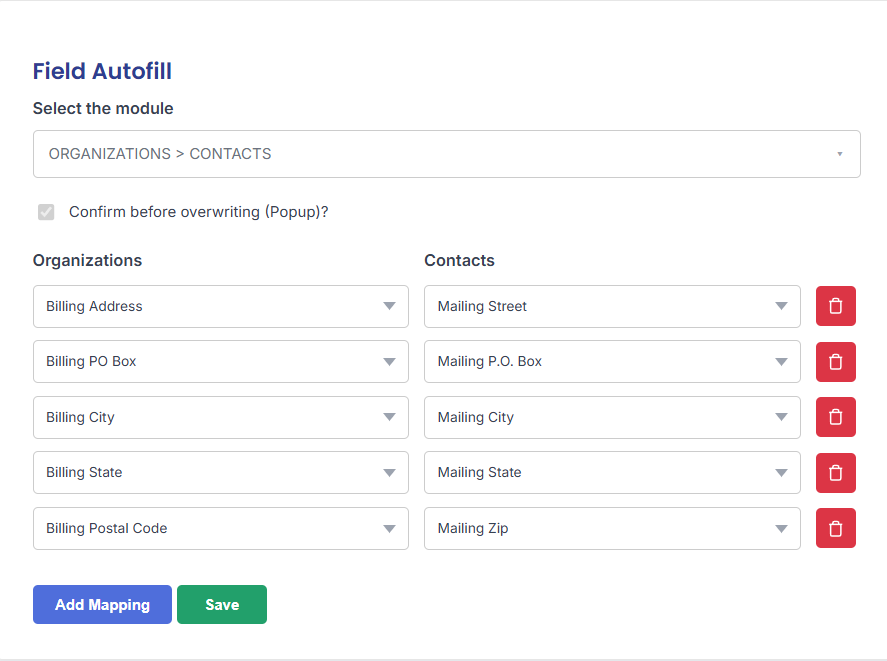
Access the extension settings by going to Other Settings > Field Autofill. Select the modules you want to link, add field mappings, and save.
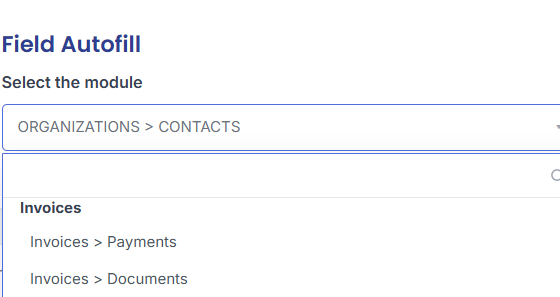
- Select the modules to link (e.g. Organization to Contact).
- Click Add Mapping and choose source and destination fields.
- Optionally enable Confirm before overwriting (Popup).
Select the Module
When creating a new record in a linked module (e.g. a new Contact), select the existing related record (e.g. an Organization). A dialog box asks you to confirm the autofill action.
- Select a related record when creating a new linked record.
- Confirm the autofill in the popup when prompted.
- Click Yes to populate designated fields e.g. organization website and address into the new contact.
Data Transfer
When creating a new record in a linked module (e.g. a new Contact), select the existing related record (e.g. an Organization). A dialog box asks you to confirm the autofill action.
- Select a related record when creating a new linked record.
- Confirm the autofill in the popup when prompted.
- Click Yes to populate designated fields — e.g. organization website and address into the new contact.

Benefits of Field Auto Fill
Less manual work, cleaner data, and more time for what matters.
Save Time
Eliminate repetitive data entry by letting the system handle it automatically.
Maintain Consistency
Ensure uniform data across all CRM modules through accurate field mapping.
Boost Productivity
Free up team members to focus on core business tasks instead of manual updates.
